
Is Your Filing System Slowing You Down?

HI!!
Do you have any feedback on the latest tips? I'm really excited about them and I really hope you're enjoying them!
Keep sending me your ideas for future tips or feedback on what’s working for you… just hit REPLY! I read and respond to every email! Try me!
Today I've got a favorite tip that I've been doing for a while - using a rule to auto file in a really cool and super productive way!
The Hidden Pull on Your Focus
I continue to notice just how much of our day gets chipped away by tiny pulls on our attention — not emergencies, not real “fires,” just the steady drip of “Check this…” “Look at that…” “Don’t forget…”
It’s quiet, but it’s constant.
And those small nudges add up more than we realize.
If you’ve been feeling stretched thin — not from big tasks, but from the background buzz — you’re not alone. We’re in a season where everything feels like it’s tapping us on the shoulder. And as I shared recently, the average professional now spends nearly a third of their work week in their inbox… not doing the work itself, just managing messages. Let me help you!
That’s a lot of life lost to noise.
I’m personally in a place where I want to protect my attention more intentionally. Not to slow down my impact, but to slow down the interruptions so my mind can stay steady, focused, and free to do the deeper work that actually matters.
Our real job today isn’t keeping up — it’s filtering wisely.
Choosing what gets in.
Choosing what gets our time.
Choosing what deserves our attention.
Because your attention is one of the most valuable things you own… and your inbox shouldn’t get to spend it for you.
The Silent Time Thief
Let's take a quick look at why your current filing system may be silently draining your time.
There’s a quiet thief in your inbox—and it’s not spam.
It’s the constant stream of non‑urgent emails that interrupt your focus, crowd your view, and pull you away from deeper work.
Newsletters. Promotions. Updates you want… but not right now.
If every message sits alongside the emails that actually require your attention, your brain treats them all as equally important. And that is where the overwhelm begins.
📏Why Outlook Rules Help You Breathe Again
Rules let you automatically move low‑priority emails out of your main inbox so you see only what matters when you sit down to work. Think of Rules as a digital gatekeeper: they quietly redirect information you do want, just not front‑and‑center while you’re working.
Part 1: How to set one up (quick):
- Right‑click on a newsletter or non‑urgent (recurring) email you've subscribed to.
- Choose Rules → Create Rule
- Select the sender/subject to match
- Choose Move to Folder
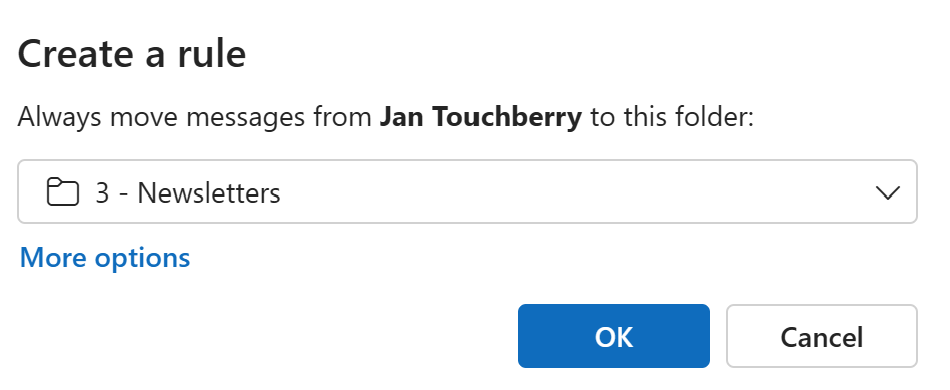
- OK
- Repeat for each newsletter/sender you want to include.
Every future email from that sender will skip your inbox and land where you want it—quietly, without the mental ping.
⚠️ A Rule without a Plan Becomes Clutter
I have a major caution!! A folder only works if it has a purpose and a schedule behind it. If you move messages “out of sight” without knowing when you’ll check them again, all you’ve done is create another inbox—and an invisible inbox is even more dangerous than a visible one because you don't remember to check it.
PART 2: Make your Rule intentional
- Pick a review rhythm you can keep (e.g., Wed at 3:30 pm for 10 minutes).
- Add a repeating appointment called “Newsletter Sweep” to your calendar. Tip: this doesn't take much mental load so don't waste your best brain power on it.
- During that block, skim, save what’s useful, and delete the rest.
- Personally, I like to associate it with something fun like an afternoon coffee (habit stacking 🔗)
Why This Matters
You’re not deleting or unsubscribing from sources that help you—you’re simply removing them from your line of sight until you choose to engage. This is about intentional attention, not more organizing.
🗃️Filing Fatigue: The Hidden Cost
When most people hear “move emails to folders,” they picture dozens of folders. That used to make sense when volumes were lower and navigation was slow. Today, too many folders create friction:
- More decisions
- More clicks
- More searching
- More “Where did I put that?” moments
Linear filing doesn’t match the way Microsoft 365 works now. Rules are just the first step toward a simpler, low‑maintenance system but I am not advocating rules upon rules or folders upon folders. Rather a very limited number of folders. If you want to learn more - my course - Inbox Relief dives deeper.
Why I Share these Tips with You!
The heart 💓 behind the work I do is that I want to help you protect your time ⏰and energy from the little drains that nibble away at your day.
I don’t want you stuck googling how to fix a spreadsheet, or buried in your inbox trying to remember who you’re waiting on.
I hope you trust me to give you the tools ⚙️to clear that noise so your time can flow toward things that matter more — your people, your health, your work you care about, and the parts of life that actually feed you.
My mission is simple: Help you use technology in a way that supports your life, instead of stealing from it.
⏰ Take Back Your Time!
If you’re ready to move beyond just turning off notifications and want a full system to master your workflow, I’d love to help you get there.
Join Inbox Relief Let’s reclaim your attention together."
🙋♀️ Want a Little More Help? I’ve Got You.
If you’re reading through these tips and thinking, “Oh wow… we could use some training on this,” you’re not alone. Reply to the email and ask for my course catalog - and I can train your team.
📚 Ready to Go Deeper?
If turning off notifications was step one…
And using Rules (with a review plan) is step two…
Then step three is designing a modern inbox structure that prevents filing fatigue altogether.
In my Inbox Relief Outlook course, I teach:
- A simple folder strategy that actually works today (and why most people are using the wrong one)
- How to keep your inbox clean without spending hours filing
- How to build an attention‑friendly workflow that matches Microsoft 365 as it is now
Your time—and your attention—deserve better than a noisy inbox.
👉www.learningwithkari.com/blog
All my best,
Kari
Microsoft 365 Trainer & Productivity Coach
learningwithkari.com
Helping you save time, get organized, and feel confident using Microsoft 365 tools.
✨ P.S. Have a question or idea for a future tip? Just hit reply — I’d love to hear from you!

Responses