

HI!!
Are you Enjoying a snowy day today?? A good day to learn INSTANT hyperlinks!!
I hope you're enjoying my Tips & Tricks! I love finding things that will save you time and help you do your job better!
Thanks to those of you who have replied back and shared feedback. Please continue to let me know ideas you have for tips or if you just want to tell me how the format is working for you....just hit REPLY!
I've got another great trick! Today's trick is about hyperlinks so here we are with Kari's Tips and Tricks #106: Hyperlink Tricks.

How Do YOU Like to Learn?
Since I'm in the business of learning - there are always 2 ways you can learn this tip #1 - Read the step by steps with screenshots or #2 - watch the video (or #3 - both 😊)
Sick of Clunky Hyperlinks ?
If you've created hyperlinks in the past, you know it can be a bit time-consuming. This new trick is AWESOME and a HUGE timesaver. This new trick works in Word, Outlook, Excel, PowerPoint and Teams.
Here's How...
- Copy a URL using Ctrl+C or right click (for example - a SharePoint file or website).
- Type or highlight the text you want to link in the app (for example - “Check this out” in email, chat or doc).

- Highlight the text, hit Ctrl+V to paste the link, and—poof!—it’s hyperlinked instantly. SO GREAT!! As of now, on my version, this works perfectly in Teams and Outlook. PowerPoint, Excel, Word and PowerPoint I have to do Ctrl+K, then Ctrl+V. (if this is confusing - watch the 2 minute video)
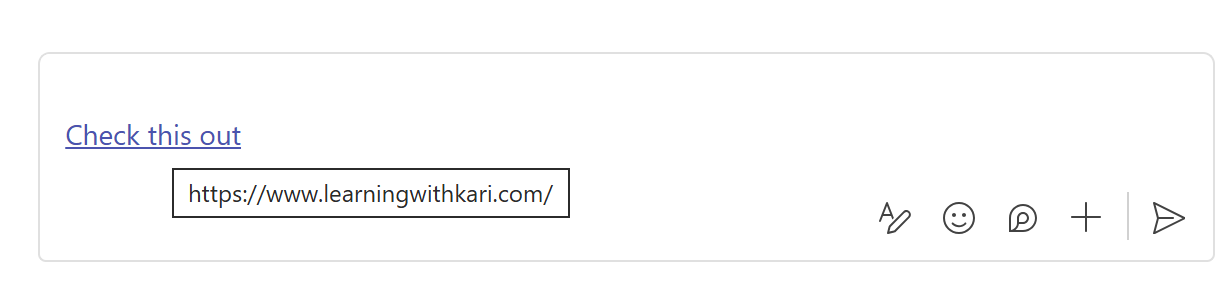
* If yours isn't working - it seems per Microsoft this is working for some but not everyone yet but the Ctrl+K, Ctrl+V
Hyperlink Tricks - Where to Use it
This is a trick that applies across the M365 Apps. There is a chance you may not have the most recent version and it's rolling in 2025 to Teams. Mine has it, but there's a chance yours may not yet.
Here's a quick summary of where you can use this.
Outlook (New and Web versions) - Select a word or phrase in an email.
Teams - Select a word or phrase in a chat.
Word, PowerPoint, OneNote - Select word, phrase or object.
Excel - Select a word or phrase within a cell
Why You’ll Love It: Works every time, everywhere—perfect for sharing resources fast.
Watch the Tip (2 minutes)
Click on the link below to watch the video.
Next Up....
Next Tips/Tricks....
Share with your friends and colleagues!
We hope you find these tips helpful. If so - please share them with your friends so they can sign up too!
But that's not all! Coming soon...I'm launching a comprehensive course on Microsoft Teams, designed to help you become a Teams Power User. Stay tuned for more details!
I'd love to hear your thoughts on this week's topic. Do you have any Microsoft Teams tips to share? Or perhaps there's a topic you'd like me to cover in the future? Reply to the email and let me know!
Until next time,
Kari Hoien, M.A. in Education Technology
Microsoft Office Expert Trainer and Consultant
PS - Did you know about my Excel and Outlook courses - you can view them here https://www.learningwithkari.com/store more coming soon!!

Responses